Cart recovery emails
Go to Apps → Vosaire: AI Chatbot & Sales → Account → Settings → Cart recovery. Off by default.
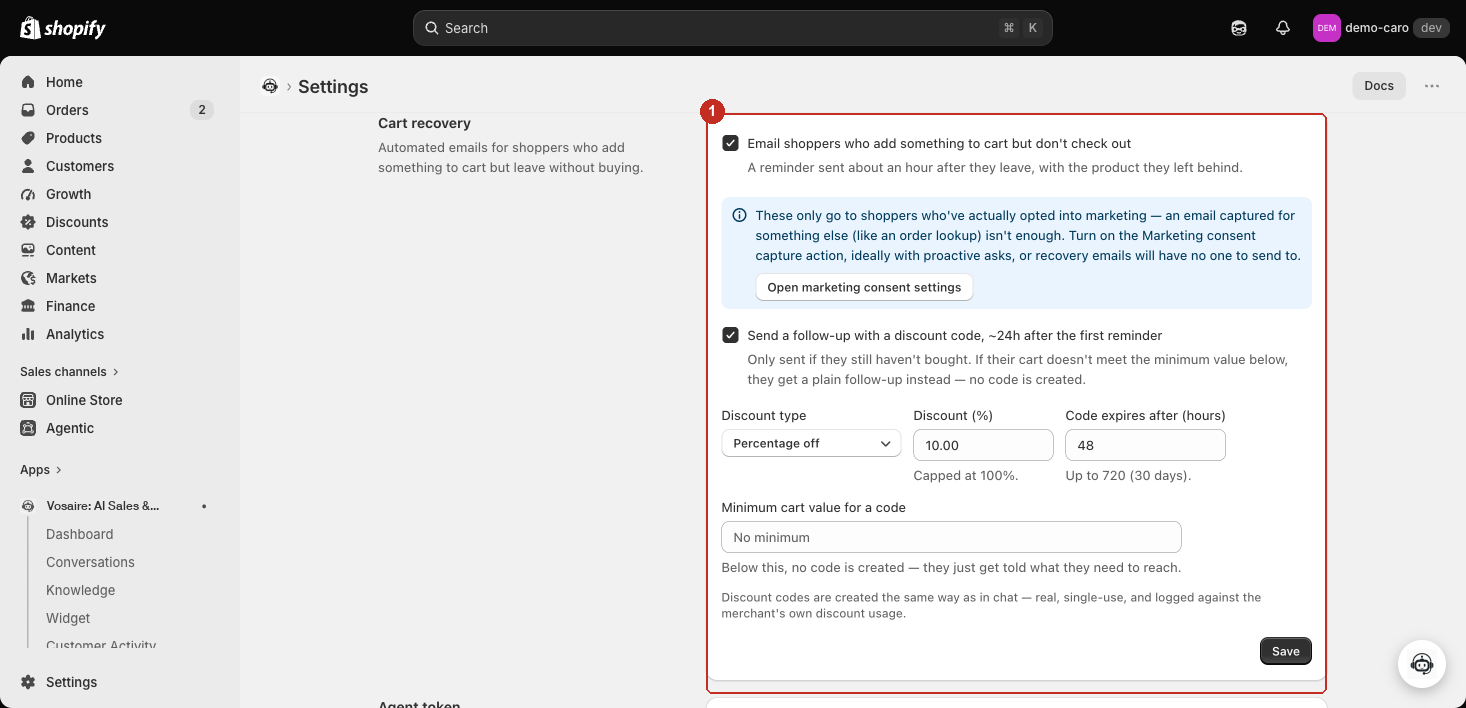
The first reminder
Check Email shoppers who add something to cart but don't check out to send a reminder about an hour after they leave, including the product they left behind.
Marketing consent is required
These emails only go to shoppers who've actually opted into marketing — an email captured for something unrelated (like an order lookup) isn't enough to send to. Turn on Marketing consent capture under Sales actions, ideally with proactive asks, or recovery emails will have no one to send to. A shortcut button (Open marketing consent settings) jumps straight there from this card.
Optional discount follow-up
Send a follow-up with a discount code, ~24h after the first reminder only fires if the shopper still hasn't bought. Once turned on, four fields appear:
| Field | What it controls |
|---|---|
| Discount type | Percentage off, or a fixed amount off |
| Discount (%) / Discount amount | The size of the discount (percentage is capped at 100%) |
| Code expires after (hours) | Up to 720 hours (30 days) |
| Minimum cart value for a code | Below this cart value, no code is created — the shopper just gets told what they need to reach instead |
Discount codes created here are real, single-use, and logged against your store's own discount usage — created the same way as a discount code Vosaire issues directly in chat.
If their cart is below the minimum
Rather than silently skipping the follow-up, the shopper still gets a message — just a plain reminder telling them what cart value they'd need to reach to get a code, instead of an actual discount.