Docs / Sales & Support Actions
Sales actions: discounts, draft orders, back-in-stock, and marketing consent
Go to Apps → Vosaire: AI Chatbot & Sales → Widget → AI Tools. The Sales section groups four actions around moving a conversation toward a purchase — all four require the Pro plan.
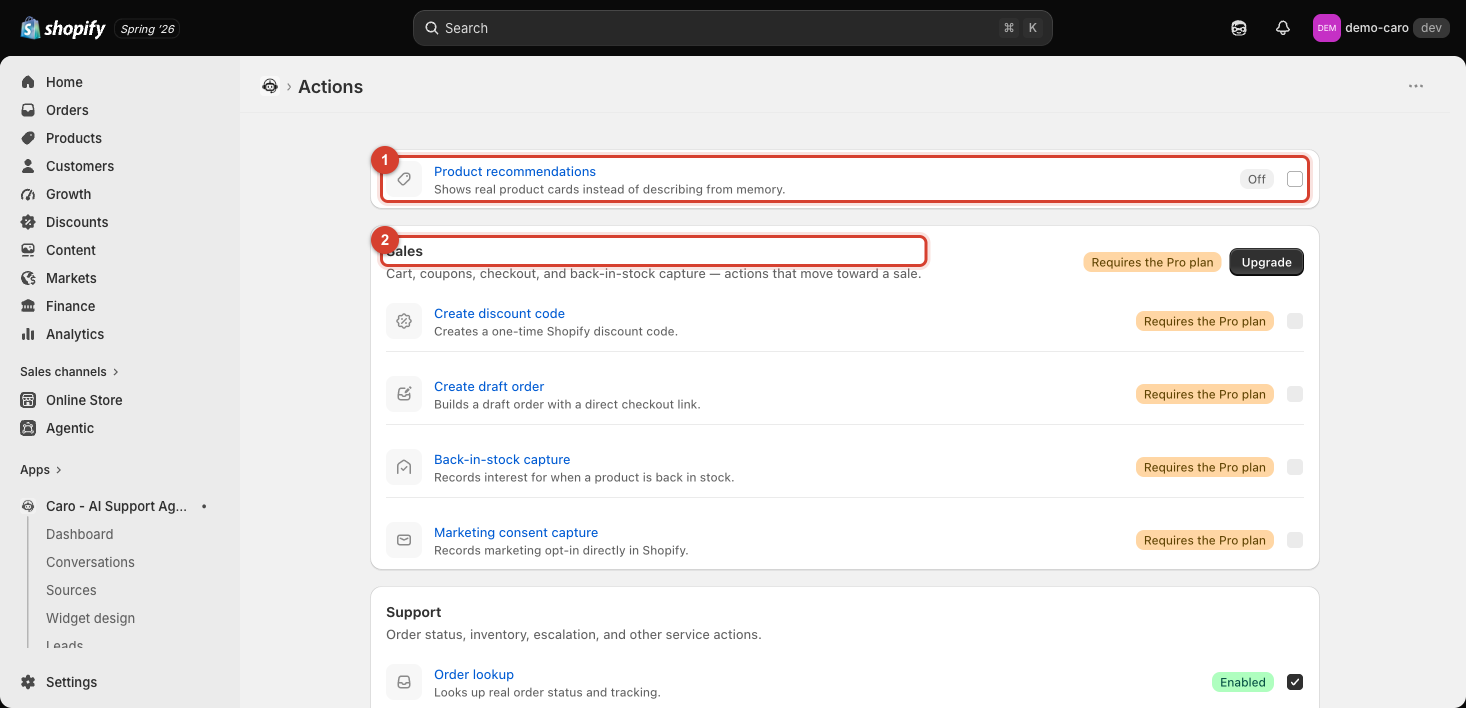
Create discount code
Creates a one-time Shopify discount code on the fly during a conversation — e.g. offering a small incentive to a hesitant customer, or issuing a goodwill discount after a complaint, without you having to do it manually in Shopify admin.
Also captures emails, if you turn it on: a separate checkbox — "Proactively offer this discount to capture emails" — lets Vosaire offer the same discount in exchange for a visitor's email at one natural moment early in a conversation, even with no price objection or complaint behind it. Still only one discount per conversation, however it was triggered. Marketing consent is never bundled into this offer — if a customer's email is captured this way, an opt-in for updates is still asked for separately, and only when your marketing consent settings call for it.
Create draft order
Builds a Shopify draft order and gives the customer a direct checkout link — useful when a customer wants to buy something Vosaire helped them configure (a bundle, a specific variant combination) without them having to re-navigate your storefront themselves. If Vosaire already has the customer's email on file, the checkout link opens with that email pre-filled.
Back-in-stock capture
Records a customer's interest in a sold-out product so you can notify them when it's restocked, directly through the conversation rather than requiring them to find and fill out a separate form.
Marketing consent capture
Records a marketing opt-in directly in Shopify when a customer agrees to receive marketing communications during a chat — keeping consent properly recorded without extra manual entry.
Enabling these
Each has its own detail page with an Enable this action checkbox, but all four are locked until you're on the Pro plan — see Plans and what they unlock.