Understanding your plan and trial
Go to Apps → Vosaire: AI Chatbot & Sales → Dashboard, or directly to Account → Billing.
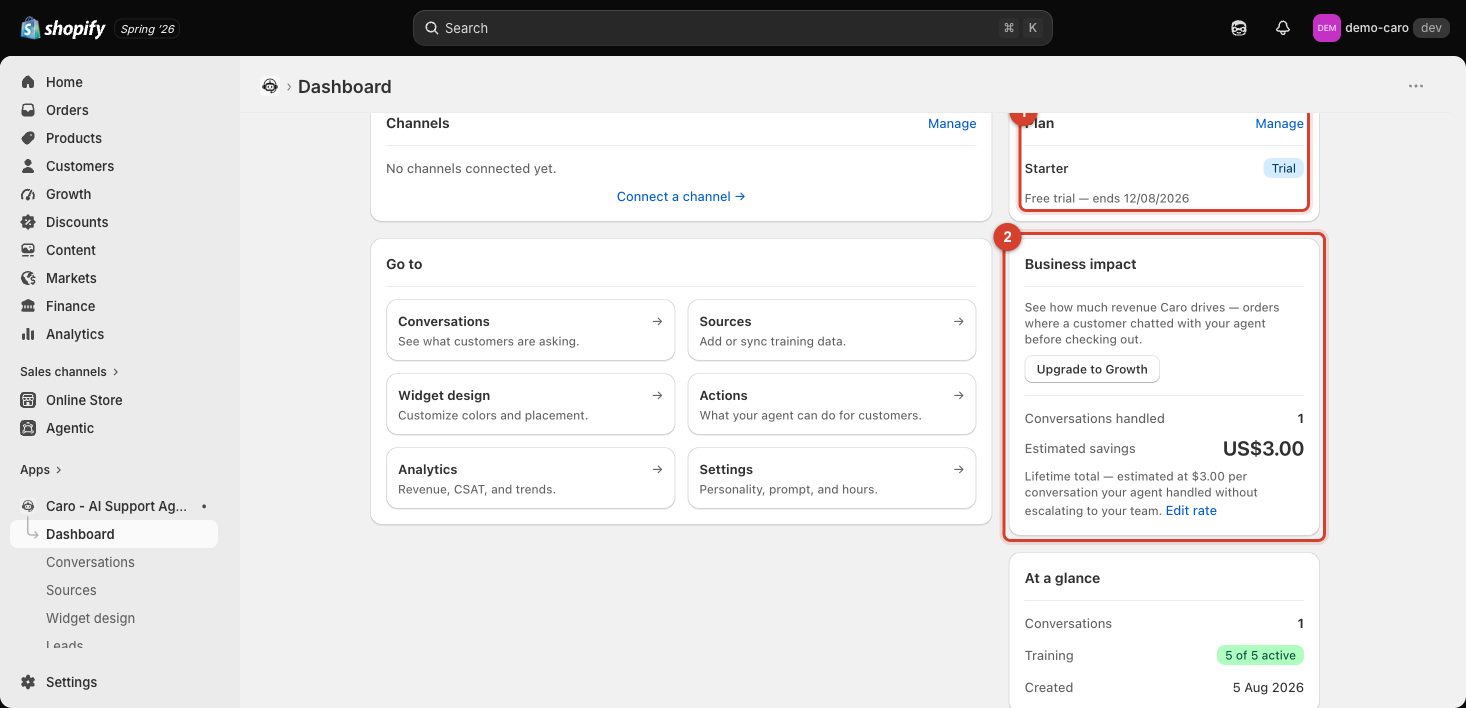
Where to check your plan
The Dashboard's Plan card shows your current plan name, a Trial badge if you're still in a trial, and the trial end date (e.g. "Free trial — ends 12/08/2026"). Click Manage to go to the full Billing page, which adds:
- Usage this month — the same AI replies / Trained pages counts shown on the Dashboard.
- Subscription history — a log of plan changes and status updates (e.g. "Starter — Current, Since 05/08/2026" / "Trial started").
- A link to View charges in Shopify Admin for the billing/invoice side of things.
Changing plans
Click Change plan from the Billing page to open Shopify's own plan-selection screen, showing every available tier side by side with full feature lists. See Plans and what they unlock for what's actually in each one.
Canceling
The Billing page is explicit about this: "To cancel or manage your subscription, go to your Shopify Admin → Apps → Vosaire: AI Chatbot & Sales → Manage subscription." Cancellation happens through Shopify's own subscription management, not a button inside Vosaire itself.
Trials
Every paid plan (Starter, Growth, Pro) includes a 7-day free trial — you can select any of them to try their features without being charged until the trial ends and regular pricing applies. Free costs nothing on an ongoing basis (no trial needed, since it's never charged).