The Conversations inbox: reading and navigating
Go to Apps → Vosaire: AI Chatbot & Sales → Conversations. This is where every conversation lands — from the storefront widget and from any connected channel (Gmail, Telegram, WhatsApp).
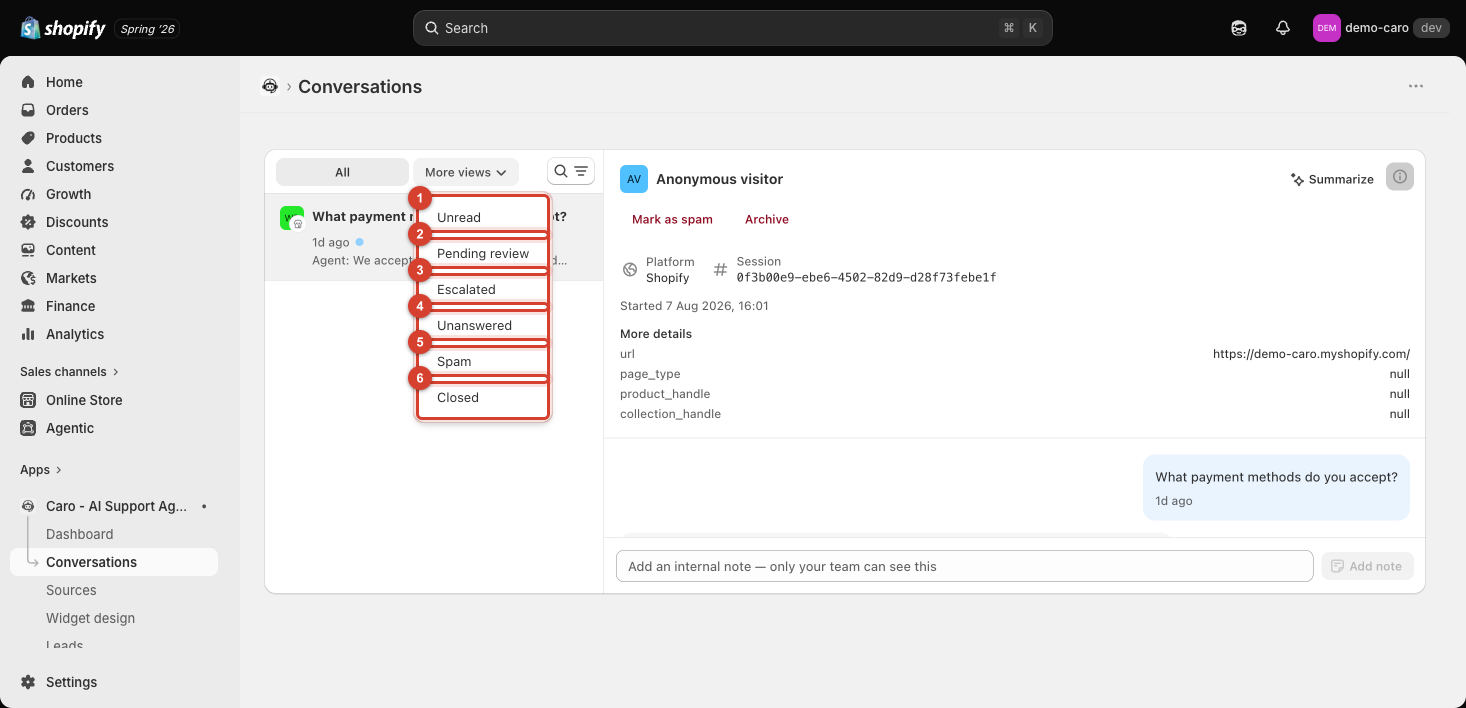
The list
Each row shows the conversation's opening question (used as its title), how long ago it happened, an Unread indicator if you haven't opened it yet, and a preview of the agent's latest reply. Clicking a row opens the full conversation on the right.
Filtering the list
Click More views to filter by status:
| Filter | Shows |
|---|---|
| Unread | Conversations you haven't opened yet |
| Pending review | Conversations flagged for a human to check |
| Escalated | Conversations the AI handed off to your team |
| Unanswered | Conversations where the AI didn't reply |
| Spam | Conversations you've marked as spam |
| Closed | Archived/resolved conversations |
The search icon next to the filter lets you search and filter results further — useful once you have more than a handful of conversations to scan through.
Anonymous vs. identified visitors
Most storefront-widget conversations start from an Anonymous visitor — Vosaire doesn't know who they are unless they've logged into a Shopify customer account or provided contact details (e.g. via Lead capture or the Order lookup action). Conversations from connected channels typically show the customer's email or phone number instead.