Reading a conversation and its sources
Open any conversation from the inbox to see the full transcript on the right.
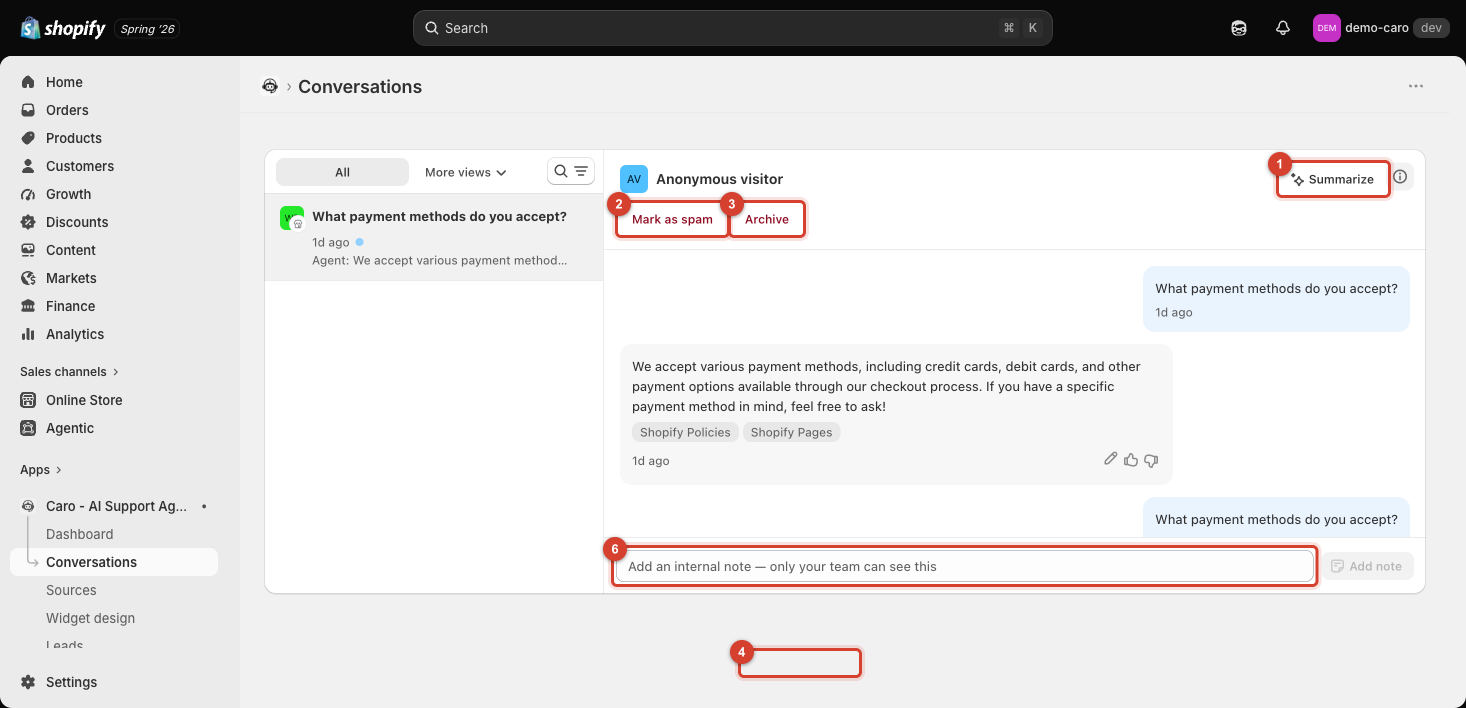
Sources used to answer
Under each of the agent's replies, small tags (e.g. Shopify Policies, Shopify Pages, Shopify Products) show exactly which Sources the reply was based on. This is controlled by the Show sources used to answer setting on Widget design → Behavior — if you see no tags, that setting may be off, or the reply didn't rely on a specific source.
Use these tags to sanity-check an answer — if a reply about your return policy doesn't tag Shopify Policies, that's worth investigating.
Session details
Click the info icon (top right) to open the conversation's session details — platform, session ID, when it started, and page context (the storefront URL, and if relevant, which product or collection page the visitor was on). See What Vosaire remembers, and what it doesn't for the full breakdown of what this panel shows.
Summarize
Click Summarize to get a quick AI-generated summary of the whole conversation — useful for a long thread you need to catch up on quickly, without reading every message.