Sources tab: how well your training data is performing
Go to Apps → Vosaire: AI Chatbot & Sales → Analytics → Sources. This is different from the Sources page under Knowledge → Sources (that's where you manage training content — see Training & Knowledge Base); this tab reports on how that content is performing.
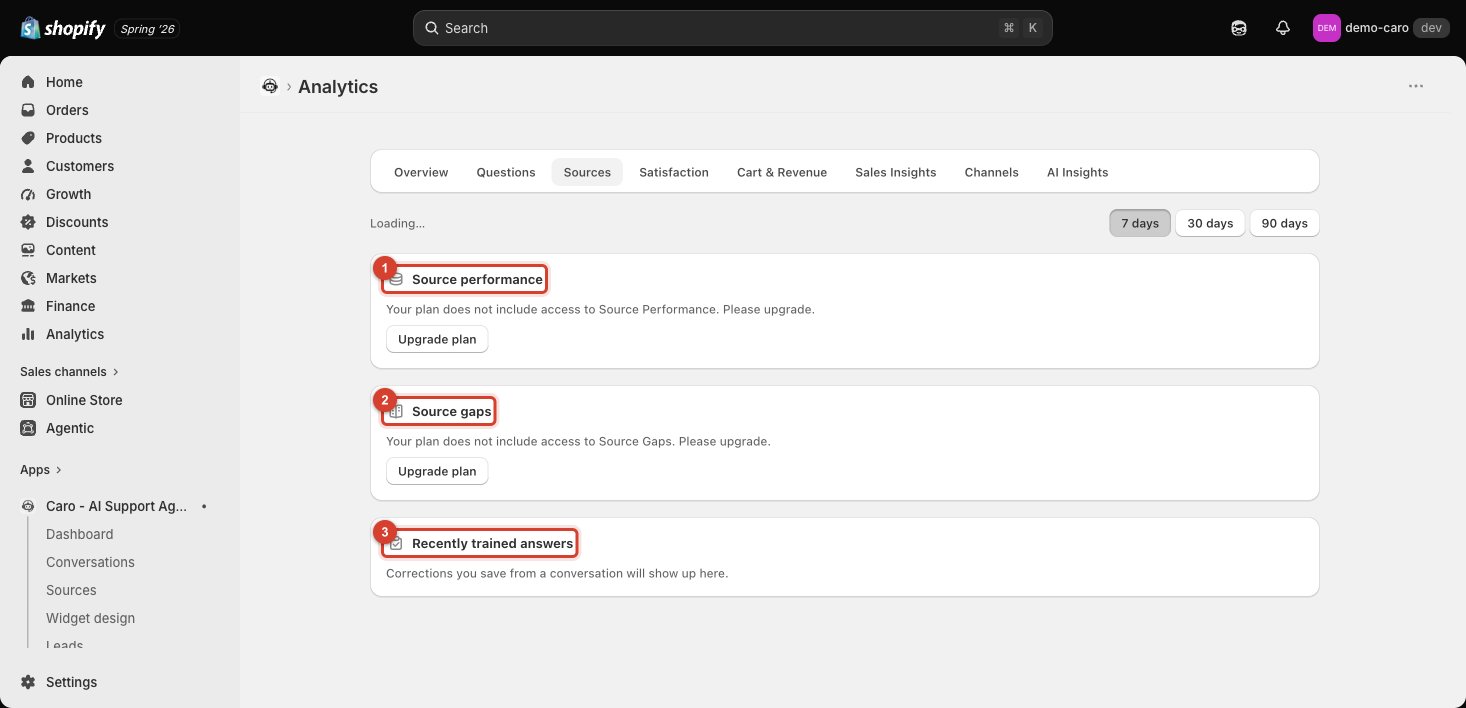
Source performance and Source gaps — paid plans
- Source performance shows which of your sources are actually getting used in replies, and how often.
- Source gaps highlights topics customers ask about where no source currently covers the answer well — a more source-focused version of the Questions tab's unanswered-questions report.
Both require a plan upgrade, shown with an Upgrade plan button.
Recently trained answers — free, all plans
This section is always available: "Corrections you save from a conversation will show up here." Every time you use Revise this answer in a conversation (see Rating and revising replies), it logs here — a running record of manual corrections, separate from anything in your actual Sources.
Using both together
Revising an answer fixes one conversation; a pattern of similar revisions showing up repeatedly in Recently trained answers is a strong signal to go make the equivalent fix permanently in Sources — so the next customer gets it right the first time.