Docs / Training & Knowledge Base
Editing and removing sources
Every source row — Store data or Custom — has an Actions menu (the ··· button at the end of the row).
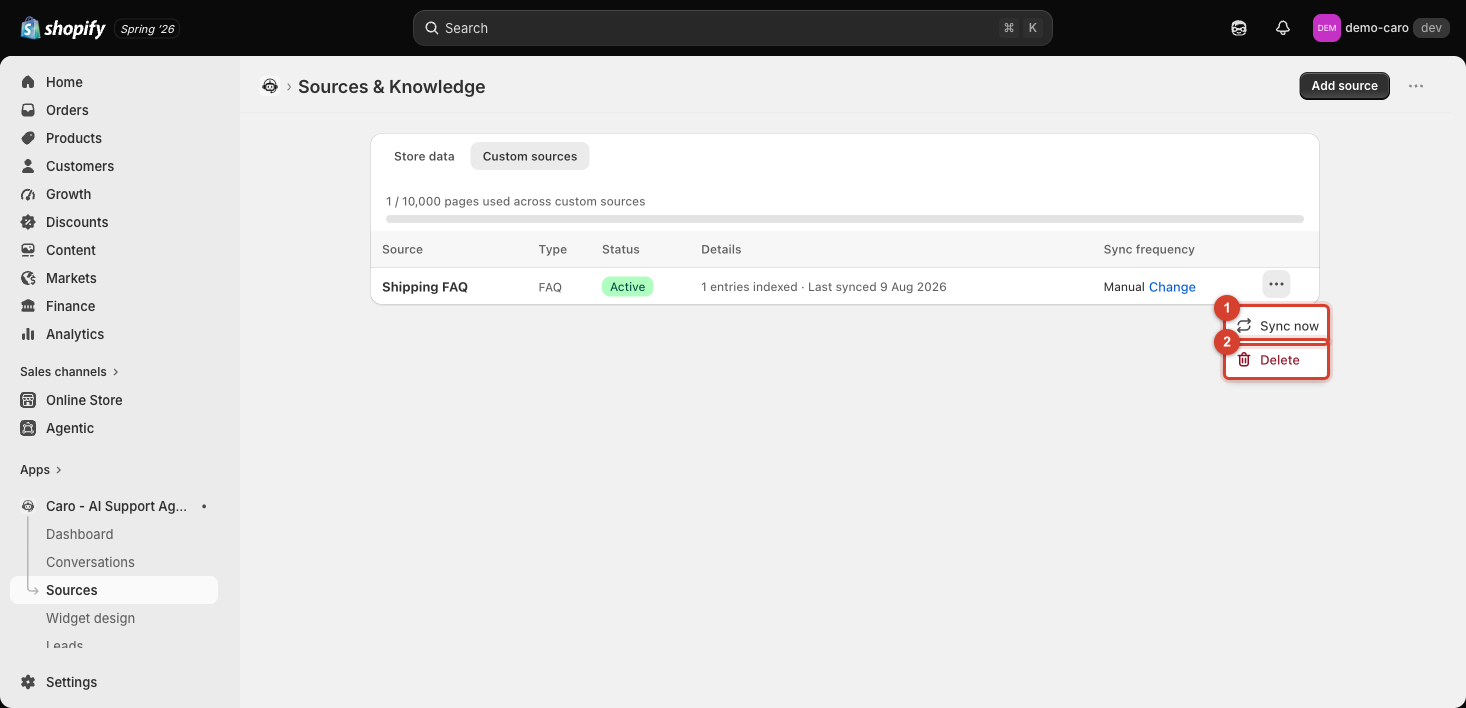
What's in the Actions menu
- Sync now — re-fetches the content immediately, without waiting for the scheduled sync.
- Delete — permanently removes the source and everything your agent learned from it. You'll be asked to confirm, since this can't be undone.
There's no in-place "Edit"
Custom sources don't have an edit screen — if the content is wrong or outdated, the fix is:
- Delete the old source.
- Click Add source and re-create it with the corrected content.
This is quick for a Text block or FAQ (just re-type the corrected version), and for a Website URL/Sitemap it usually doesn't matter — click Sync now instead, since re-syncing re-fetches the live page and picks up any edits you made there.
Store data sources can't be deleted
The five automatic Store data sources (Products, Collections, Pages, Blog Posts, Policies) don't have a Delete option — only Sync now and, where applicable, Change for sync frequency. To stop Vosaire from using a specific page or policy, edit or unpublish it in Shopify directly; Vosaire will pick up the change on the next sync.