The Behavior tab is where you shape how your agent actually talks. Same knowledge base, different behavior settings, very different results. It's worth spending a few minutes here.
Go to your agent → Behavior tab.
Personality template
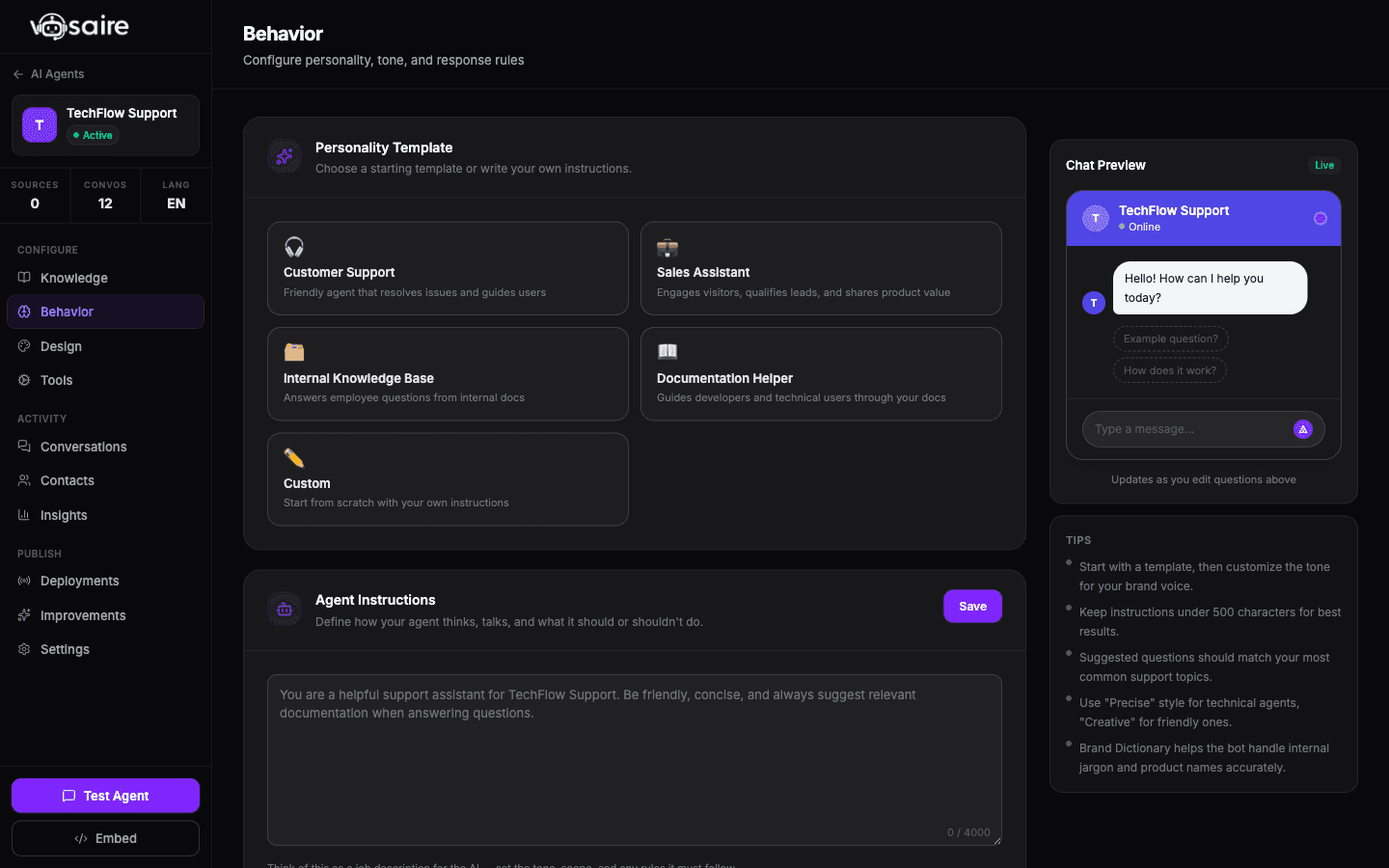
At the top is a set of preset personality templates:
- Customer Support — helpful, patient, focused on resolving issues
- Sales Assistant — proactive, highlights benefits, nudges toward conversion
- Internal Knowledge Base — direct and factual, assumes a knowledgeable audience
- Documentation Helper — structured, technical, references docs explicitly
- Custom — starts blank, you write everything yourself
Pick the one that fits your use case. Each template pre-fills the instructions field with a starting point you can edit.
Agent instructions
This is the most important field. Think of it as a job description for the agent — it reads this before every conversation and uses it to guide its behavior.
Good instructions cover:
- What the agent is there to help with ("You help customers with billing questions and account management for Acme SaaS")
- What tone to use ("Keep responses brief and friendly. Don't use jargon.")
- What to do when it doesn't know something ("If you're not sure, say so and offer to escalate to a human")
- Any hard rules ("Never share pricing — always direct users to the sales team")
The field has a 4,000 character limit. You don't need to use all of it — a clear 200-word instruction set often works better than a sprawling 1,000-word one.
Response style
Three tone presets control how creative vs. consistent the responses are:
- Precise — very consistent, almost identical phrasing for similar questions. Good for compliance-sensitive contexts.
- Balanced — the default, handles most situations well
- Creative — more varied, sometimes more natural-sounding but less predictable
Start with Balanced and adjust from there based on what you see in real conversations.
Suggested questions
These are clickable chips that appear when a user first opens the chat widget. They're shortcuts to common questions and help new visitors know what to ask.
You can add up to 6 questions, each up to 200 characters. Good ones are short and specific:
- "How do I cancel my subscription?"
- "What's included in the free plan?"
- "How long does setup take?"
Click Auto-suggest and Vosaire will analyze your last 100 conversations and suggest questions based on what users actually ask.
Brand dictionary
If your product uses specific terms, acronyms, or phrases that should always be used consistently, add them here. Each entry has a term, a definition, and an optional category.
For example: SKU → "a unique product identifier" or MRR → "Monthly Recurring Revenue".
The agent will use these definitions when these terms come up in conversation, which helps accuracy and brand consistency.
Tips
- Make a change, then hit Test Agent to see how it affects responses — it's much faster than waiting for a real customer conversation.
- If the agent is being too verbose, say so explicitly in the instructions: "Keep all responses under 150 words unless the user asks for more detail."
- If it's hallucinating things not in your sources, add a line like "Only answer from the provided knowledge. If unsure, say so."