Docs / Training & Knowledge Base
Sync frequency: Automatic vs. Manual
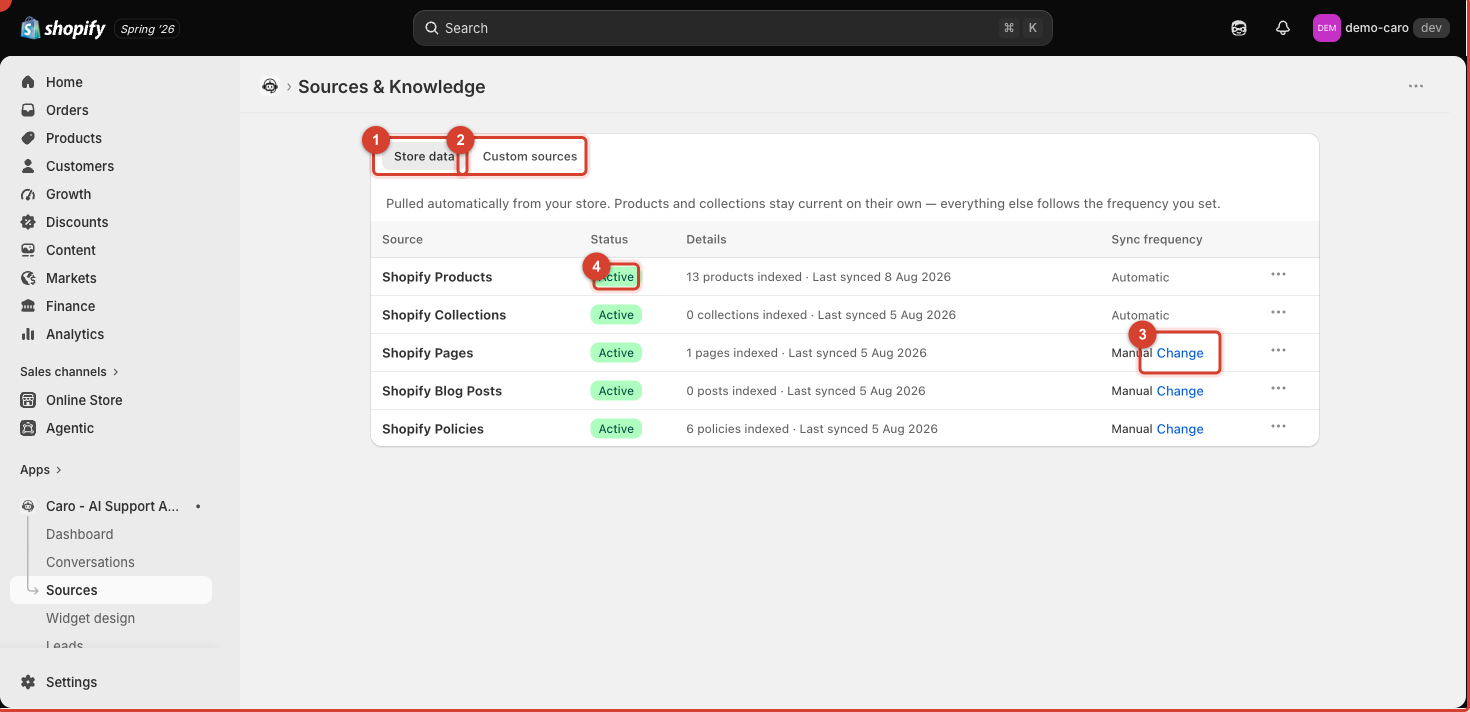
Every source that isn't a live Shopify product or collection has a Sync frequency setting, visible on the Sources page.
Automatic
Vosaire re-checks the source on a regular schedule and re-indexes it if the content changed. Use this for:
- A help-centre sitemap that's updated by your team regularly
- A blog you post to often
- Pages that change seasonally (shipping cutoffs, promo terms)
Manual
Vosaire indexes the content once and won't check it again until you tell it to. Use this for:
- Content that rarely changes (core policies, a size chart)
- Anything you want full control over — you re-sync deliberately after making an edit, rather than trusting a schedule
- Reducing unnecessary re-crawling of large sitemaps
Forcing a re-sync
Whether a source is Automatic or Manual, you can always force an immediate re-sync from its row's Actions menu (the ··· button). Do this right after editing the underlying page or file so the change is reflected without waiting for the next scheduled sync.
Which should you pick?
Default to Manual for anything you edit rarely, and Automatic only for sources that change often enough that remembering to re-sync manually would be a burden. Every unnecessary re-sync uses part of your source page quota, so Automatic isn't free.