Docs / Training & Knowledge Base
How Vosaire trains on your store data automatically
Go to Apps → Vosaire: AI Chatbot & Sales → Knowledge, on the Sources tab. The Store data tab within it (the default view) lists everything Vosaire pulls straight from your Shopify store — no setup required.
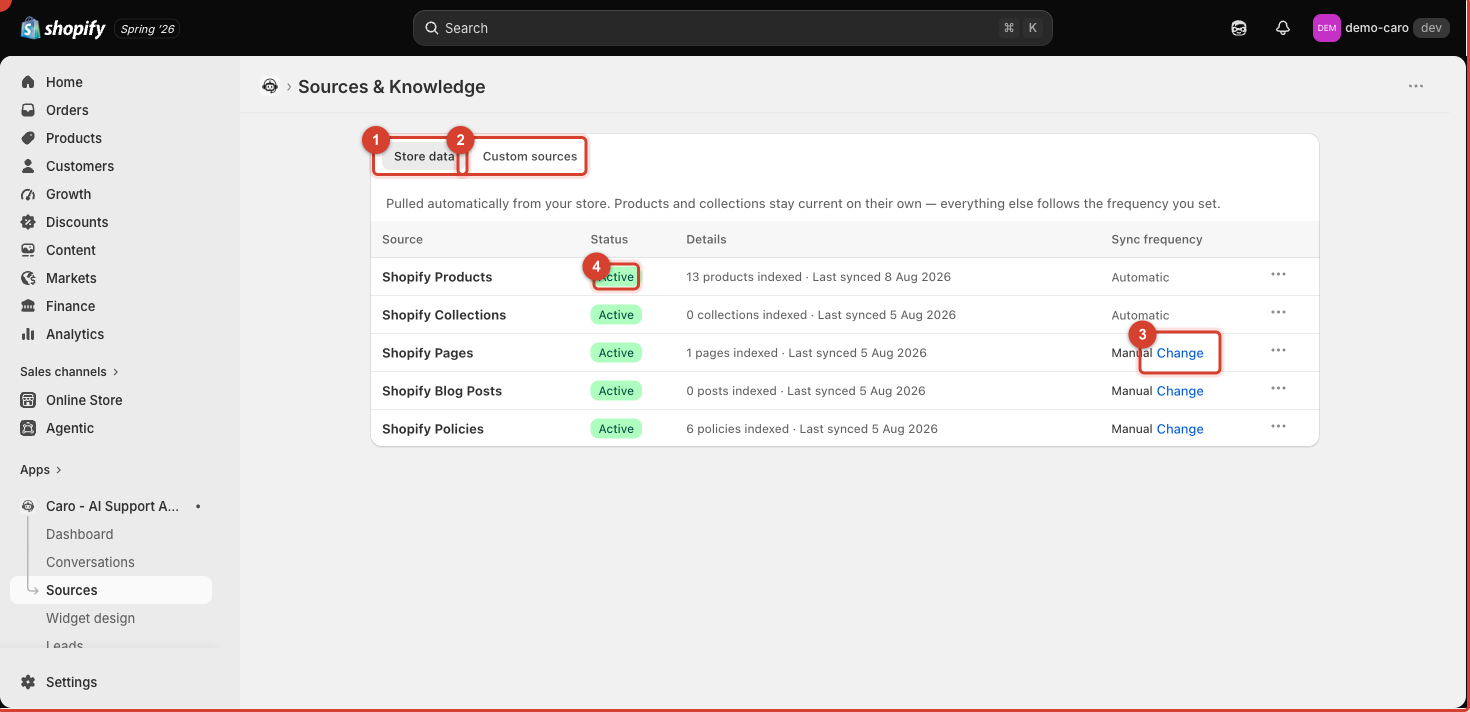
What's included
| Source | Sync | Notes |
|---|---|---|
| Shopify Products | Automatic | Always current — updates the moment you edit a product |
| Shopify Collections | Automatic | Always current |
| Shopify Pages | Manual (configurable) | Your storefront pages (About, Sizing Guide, etc.) |
| Shopify Blog Posts | Manual (configurable) | Your blog content |
| Shopify Policies | Manual (configurable) | Refund, shipping, privacy, and terms pages from Settings → Policies |
Each row shows a Status (Success/Active once indexed), a Details column with the item count and last-synced date, and the current Sync frequency.
Changing sync frequency
Products and collections always stay current automatically — this can't be changed, since keeping live inventory and pricing accurate is essential to answering customer questions correctly.
For Pages, Blog Posts, and Policies, click Change next to Sync frequency to switch between automatic and manual syncing. If you edit a policy or page and want Vosaire to pick it up immediately rather than waiting for the next sync, open its Actions menu (the ··· button at the end of the row) and re-sync it manually.
Why "0 collections indexed" or "0 posts indexed" can be normal
If your store has no blog posts or every collection is a smart/automated collection with nothing custom to describe, a 0 count simply means there's nothing there yet — it isn't an error. Add content in Shopify and it will appear here on the next sync.
See also: Custom sources: adding URLs, FAQs, and files.