Connecting Telegram
Go to Apps → Vosaire: AI Chatbot & Sales → Channels & Integrations → Channels → Add a channel → Telegram.
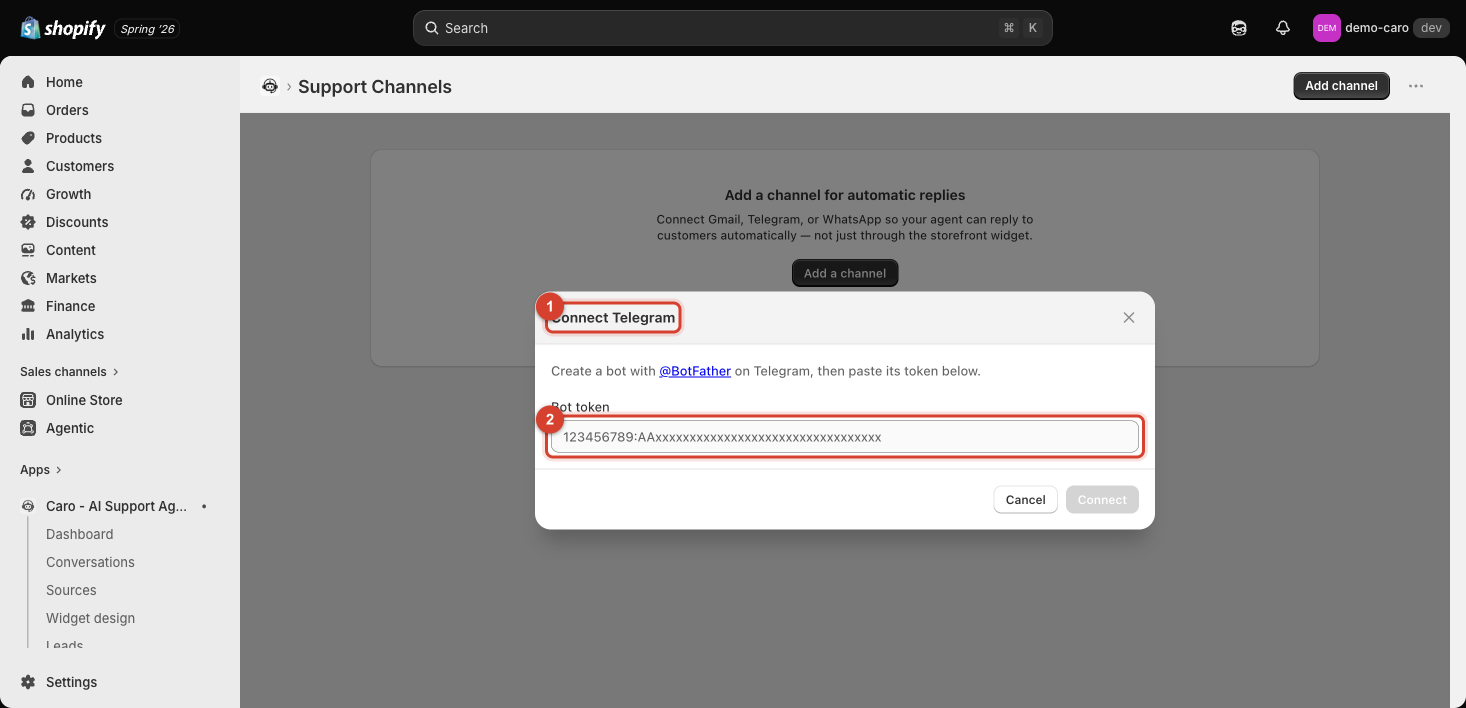
Setup
- Open Telegram and message @BotFather (Telegram's official bot for creating other bots).
- Create a new bot and copy the bot token it gives you (a string that looks like
123456789:AAxxxxxxxxxxxxxxxxxxxxxxxxxxxxxxxxx). - Paste that token into the Bot token field in the dialog.
- Click Connect.
Why a bot, not your personal account
Telegram's Bot API is how third-party services send and receive messages on the platform — Vosaire replies to customers as your store's bot, not as a personal Telegram account. This also means customers message the bot's username, which you'll want to link from your storefront or socials once it's set up.
Keep the bot token private
Treat the bot token like a password — anyone with it can send messages as your bot. If you ever suspect it's been exposed, revoke it in @BotFather and generate a new one, then reconnect here with the new token.