Business impact and estimated savings
Go to Apps → Vosaire: AI Chatbot & Sales → Dashboard. The Business impact card is available on every plan, though its scope grows on Growth.
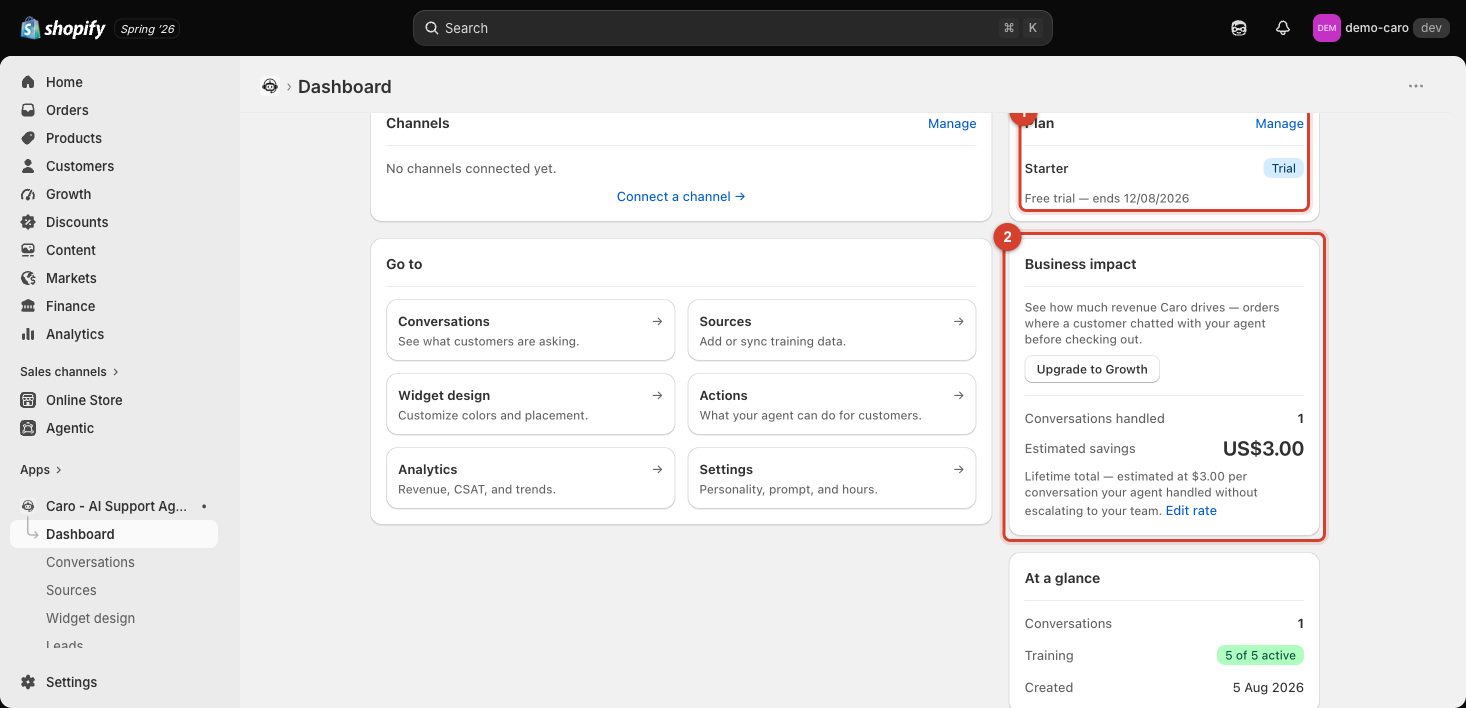
What it shows on every plan
- Conversations handled — the number of conversations Vosaire completed without escalating to your team.
- Estimated savings — a dollar figure calculated as: (conversations handled) × (your configured cost-per-reply). The card is explicit that this is a "Lifetime total", and shows the rate used (e.g. "estimated at $3.00 per conversation").
Making the estimate accurate: Edit rate
Click Edit rate to set the dollar figure that represents what a human-handled conversation would have cost you. This is the one input driving the whole "Estimated savings" number — set it to a realistic value (e.g. your actual average cost per support ticket) rather than leaving a default, or the savings figure won't mean much.
Revenue Attribution — Growth plan
The card also offers Upgrade to Growth with the pitch: "See how much revenue Vosaire drives — orders where a customer chatted with your agent before checking out." This is the real, tracked version of business impact — actual attributed revenue, not an estimate — covered in full on the Cart & Revenue tab.
Estimated savings vs. real revenue
Treat these as two different kinds of evidence: Estimated savings is a rough, self-configured proxy available immediately on any plan, while Revenue Attribution (Growth+) is real, order-level data. If you're deciding whether Vosaire is worth its cost, the Growth-plan revenue numbers are the more convincing figure — the Free/Starter-plan estimate is meant as a directional signal, not a precise ROI calculation.