Blog / AI Search & AEO / Guides
October 22, 2026
How to Track ChatGPT Traffic and Sales in Shopify
To track ChatGPT traffic in Shopify, open Analytics → Reports → Sessions by referrer and look for chatgpt.com, or check GA4's "AI Assistant" channel if your store uses Google Analytics 4. ChatGPT tags many of the links it sends with utm_source=chatgpt.com, which makes the visits easy to spot. Tracking sales from AI takes one more step: connecting those visits to the orders that follow, which neither report does perfectly on its own.
This guide walks through both tools, shows what the numbers can and can't tell you, and covers how to see sales, not just visits. If you're still at the stage of getting ChatGPT to mention you at all, start with how to get your Shopify store recommended by ChatGPT.
Why track AI traffic separately?
Because it's growing fast from a small base, and because it behaves differently. Adobe Analytics found that traffic to US retail sites from generative AI tools rose 693.4% during the 2025 holiday season compared with the year before, while noting that "the base of users remains modest" (Adobe).
For a single store, the numbers are often small today. That's exactly why it's worth setting up tracking now: you'll have a baseline to compare against as you work on your AEO, and you'll see which assistants and pages actually bring buyers.
How does ChatGPT traffic show up?
When a shopper clicks a link in a ChatGPT answer, your store receives the visit in one of two ways:
- With a UTM tag. ChatGPT adds
utm_source=chatgpt.comto the links in its answers, so analytics tools can tell the visit came from ChatGPT. As of October 2026 this tag is the signal to count: most ChatGPT clicks no longer pass a referrer (Relevant Audience). - With a referrer. The browser tells your store which site the visitor came from, such as
chatgpt.com. Perplexity, Gemini, Copilot and Claude visits are usually identified this way.
Other assistants work similarly, with referrers like perplexity.ai, gemini.google.com, copilot.microsoft.com and claude.ai.
Some AI visits arrive with neither: when a shopper copies a link, when an app opens it in its own in-app browser, or when a privacy setting strips the referrer. Those land in "Direct." Every method below undercounts a little for this reason.
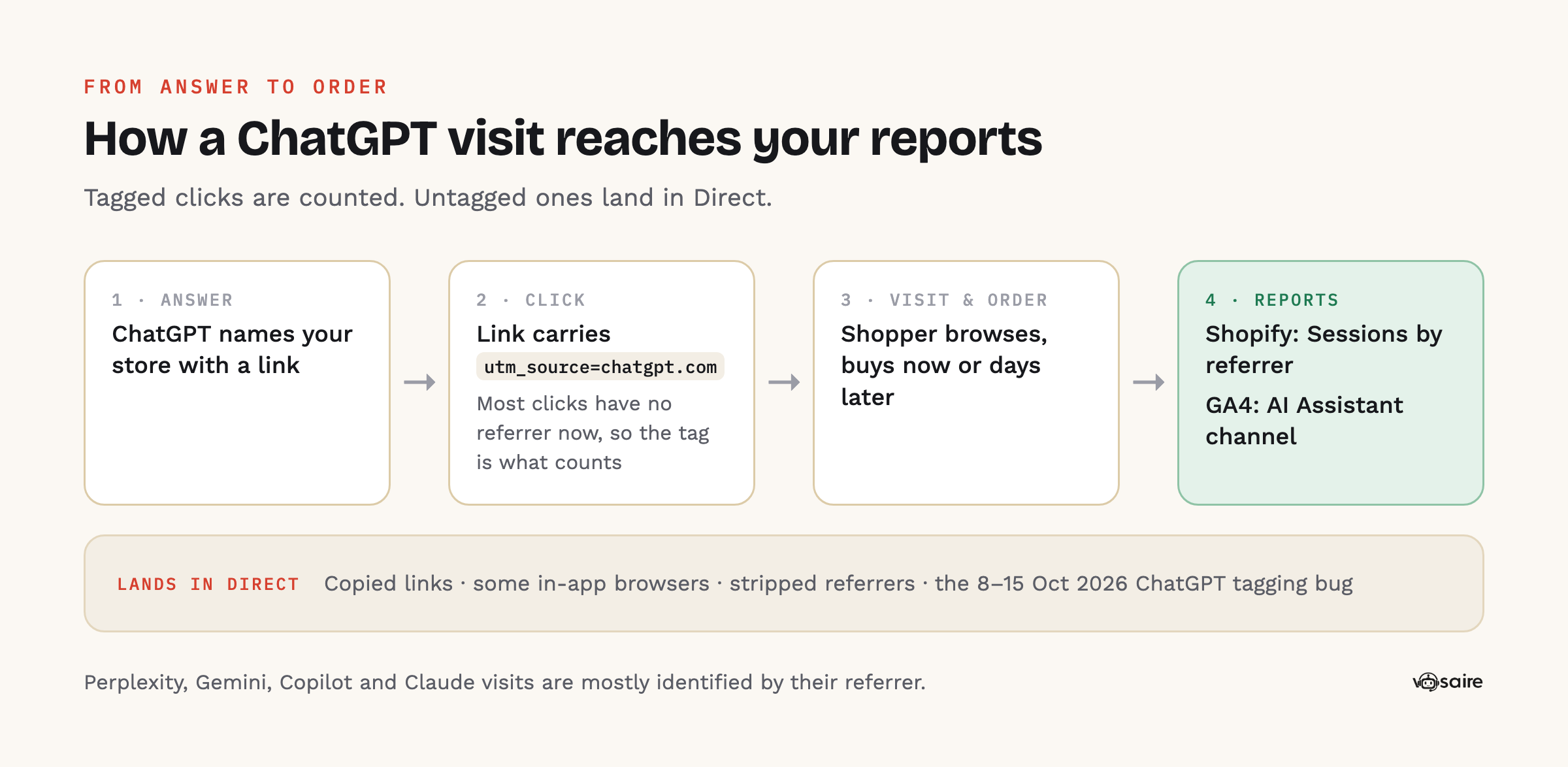
A gap to know about (8–15 October 2026). For about a week after GPT-6 launched, ChatGPT stopped adding the UTM tag, and its clicks showed up as Direct. Adobe's Cedric Huesler reported that OpenAI called it a known bug and that a fix rolled out on 15 October; OpenAI hasn't commented publicly (Relevant Audience). If your ChatGPT visits dipped that week while Direct rose, that's why. Add a note on those dates in GA4 so the dip isn't mistaken for a real drop.
Method 1: Shopify's Sessions by referrer report
This works on every Shopify plan and needs no setup.
- In your Shopify admin, go to Analytics → Reports.
- Open the Acquisition category and choose Sessions by referrer.
- Set the date range (the last 30 or 90 days is a good start).
- Look for rows with AI sources:
chatgpt.com,perplexity.ai,gemini.google.com,copilot.microsoft.com,claude.ai.
Shopify groups referrers by channel, platform and medium, and shows raw data for referrer and UTM dimensions (Shopify Help Center). Use Edit columns to add the UTM source column, then filter for chatgpt.com. Save the filtered report so you can open it again in one click.
What it's good for: a quick, free answer to "is AI sending me visitors, and which assistant?"
What it misses: it counts sessions, not orders. Shopify's sessions are cookie-based and end after 30 minutes of inactivity, so a shopper who visits from ChatGPT today and comes back to buy next week through Google shows up as two unrelated sessions. Also note these reports cover the Online Store channel only.
Method 2: Google Analytics 4
If your store sends data to GA4 (usually through Shopify's Google & YouTube app), you get a more flexible view.
Use the built-in AI Assistant channel
GA4's default channel group now includes an AI Assistant channel for users arriving from "sources like ChatGPT, Gemini, Deepseek, Copilot, or Grok" (Google Analytics Help). To see it:
- Go to Reports → Acquisition → Traffic acquisition.
- Set the primary dimension to Session default channel group.
- Find the AI Assistant row. Add Session source as a secondary dimension to see which assistant.
Google notes this channel doesn't include Google's own AI Overviews or AI Mode. Clicks from those count as regular Google search traffic and are reported in Search Console with the rest of your web search traffic (Google Search Central).
Optional: a custom channel group
If you want full control over which sources count as AI (for example, to make sure Perplexity is included), create your own:
- Go to Admin → Data display → Channel groups and copy the default group.
- Add a new channel called "AI assistants" with the condition Session source matches regex, for example:
^(chatgpt\.com|chat\.openai\.com|perplexity\.ai|gemini\.google\.com|copilot\.microsoft\.com|claude\.ai|grok\.com)$ - Move it above "Referral" in the list. GA4 assigns each session to the first channel it matches, so if Referral comes first it will swallow your AI traffic.
- Save, then pick your new group in the Traffic acquisition report.
Test it by clicking a link to your store from a real ChatGPT answer and checking GA4's real-time report.
See sales, not just visits
In GA4, open Reports → Monetization → Ecommerce purchases, or the Traffic acquisition report with Purchase revenue and Key events columns. Filter to the AI Assistant channel to see purchases attributed to AI sessions.
What it misses: GA4 only sees visitors who accepted analytics cookies, which can be a large share of traffic in the EU and UK. And by default GA4 credits each purchase to a single session, so a shopper who discovered you in ChatGPT and bought later after a Google search is often credited to Google.
Method 3: Check your agentic storefront channels
AI assistants don't only send visitors to your store. Through Shopify's agentic storefronts, products from eligible stores are available inside ChatGPT, Google AI Mode, Gemini, Microsoft Copilot and Meta. With ChatGPT, shoppers check out on your online store; with the others, direct checkout inside the AI channel is available if you turn it on (Shopify Help Center).
Go to Sales channels → Agentic in your admin to see which channels are on. Shopify says the channel gives you insights into search and sales performance. Orders placed through direct checkout won't appear as Online Store sessions at all, so check them here and in your sales reports by channel, not only in your traffic reports.
Comparing the methods
| Shopify Sessions by referrer | GA4 AI Assistant channel | Agentic channel reports | |
|---|---|---|---|
| Setup | None | GA4 connected | None |
| Shows visits | Yes | Yes | n/a |
| Shows orders and revenue | No (sessions only) | Yes, for consenting visitors | Yes, for orders placed in AI channels |
| Catches "visited from AI, bought later" | No | Partly | n/a |
| Misses | Untagged AI clicks | Visitors who declined cookies; untagged clicks | Visits to your online store |
What the numbers will always miss
Be realistic about what AI attribution can tell you:
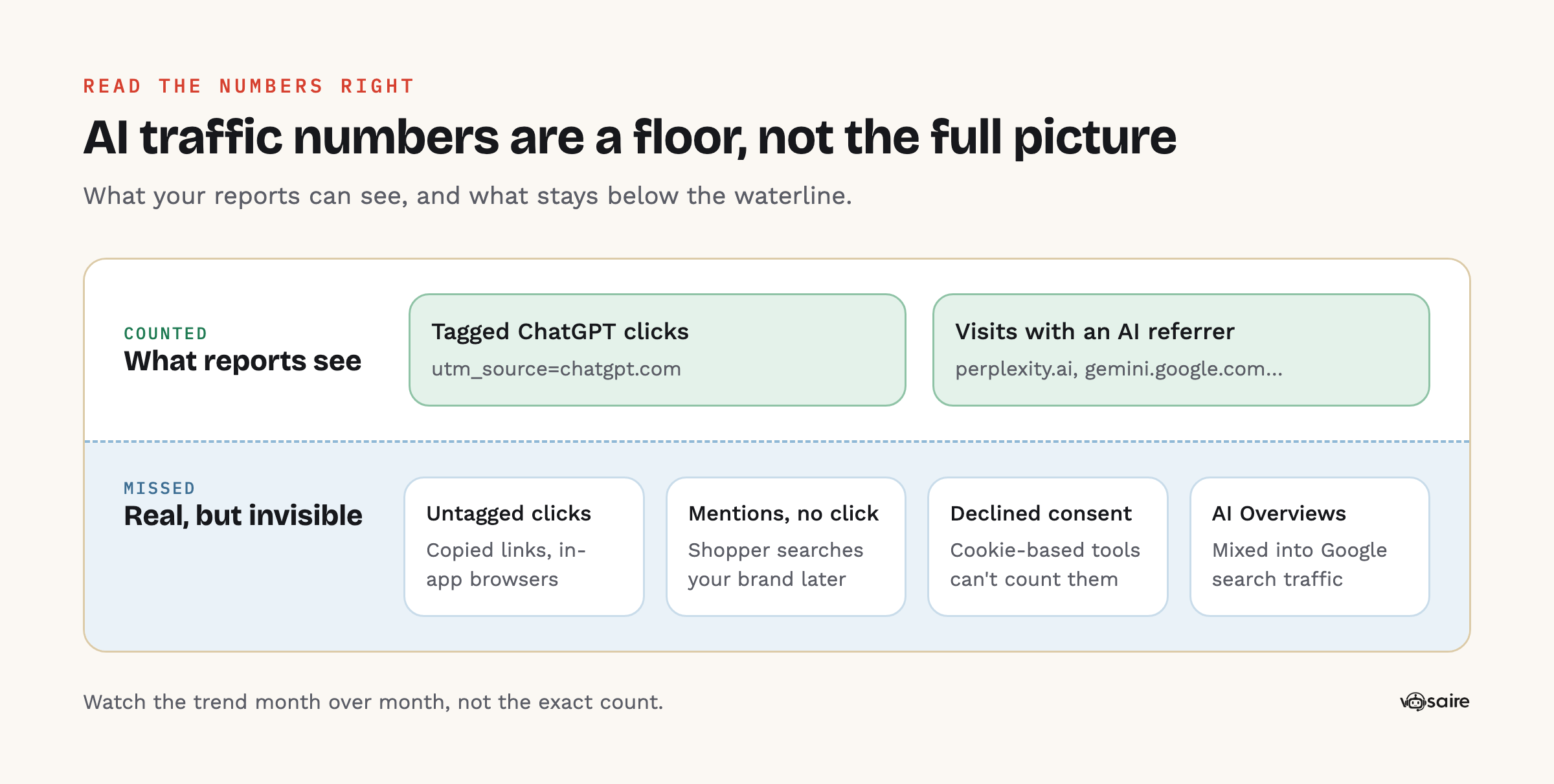
- Untagged clicks. Copied links and in-app browsers often lose both the UTM tag and the referrer and show up as Direct.
- Mentions without clicks. A shopper may read ChatGPT's answer, remember your brand and search for you on Google days later. That influence is real but shows up as branded search or Direct, not AI.
- Consent. Visitors who decline analytics tracking aren't counted by cookie-based tools.
- AI Overviews. Clicks from Google's AI features are mixed into normal Google search traffic.
So treat AI traffic numbers as a floor, not the full picture. Trends matter more than exact counts: if AI sessions and AI-assisted orders are rising month over month while you work on visibility, that's the signal you want.
A simple monthly routine
- Open your saved Sessions by referrer report and note AI sessions by assistant.
- Check GA4's AI Assistant channel for purchases and revenue.
- Check Sales channels → Agentic for orders placed inside AI channels.
- Look at which landing pages AI visitors arrive on. Those pages are being cited; keep them accurate and up to date.
- Compare with last month, and with the buyer questions you're tracking in the assistants themselves.
Can an app do this for me?
Yes. Several AI visibility apps include AI traffic tracking; we compared them in the best AI visibility apps for Shopify. In Vosaire AI Visibility, storefront tracking spots visits from AI assistants by their link or the page they came from, and counts an order as AI revenue when that shopper visited from an AI assistant in the 30 days before buying, which catches the "visited from ChatGPT, bought next week" case that session reports miss. Shoppers who decline analytics tracking aren't counted, the same limit every cookie-based tool has. The AI sales tracking guide explains the details.
FAQ
Why don't I see any ChatGPT traffic in Shopify?
Either ChatGPT isn't linking to your store yet, or the visits are arriving untagged and counted as Direct. Check that ChatGPT can reach your store first: OpenAI's OAI-SearchBot must be allowed in your robots.txt for your pages to appear in ChatGPT search answers (OpenAI).
Does utm_source=chatgpt.com appear on every ChatGPT click?
No. It appears on links clicked in ChatGPT answers, but copied links and some in-app browsers lose it, and it was missing entirely from about 8 to 15 October 2026 because of a bug. Use the referrer and GA4's AI Assistant channel as well, not the UTM alone.
Is AI traffic worth tracking if it's tiny?
Yes. Setting up takes a few minutes, and having a baseline now is what lets you see whether your AEO work is paying off later.
How do I track traffic from Google's AI Overviews?
You can't separate it cleanly. Google reports clicks from AI Overviews and AI Mode as part of normal web search traffic in Search Console.
What about Perplexity, Claude and Copilot?
The same methods work: look for perplexity.ai, claude.ai and copilot.microsoft.com in your referrer report, and include them in a custom GA4 channel group if the default AI Assistant channel doesn't catch them.