Blog / AI Search & AEO / Guides
October 22, 2026
How to Get Your Shopify Store Recommended by ChatGPT (Step by Step)
To get your Shopify store recommended by ChatGPT, make sure ChatGPT can reach your store, give it clear and complete product information, publish pages that directly answer the questions your buyers ask, and earn mentions on other trusted sites. Then ask ChatGPT your buyer questions regularly to see whether it's working. Nobody can force an assistant to name you, but each of these steps removes a reason it wouldn't.
This is the hands-on companion to our explainer on what AEO is and why it matters for Shopify. Each step below says what to do, where to do it in Shopify, and how to tell if it's done. The same steps help with Gemini, Perplexity, Claude and Copilot too.
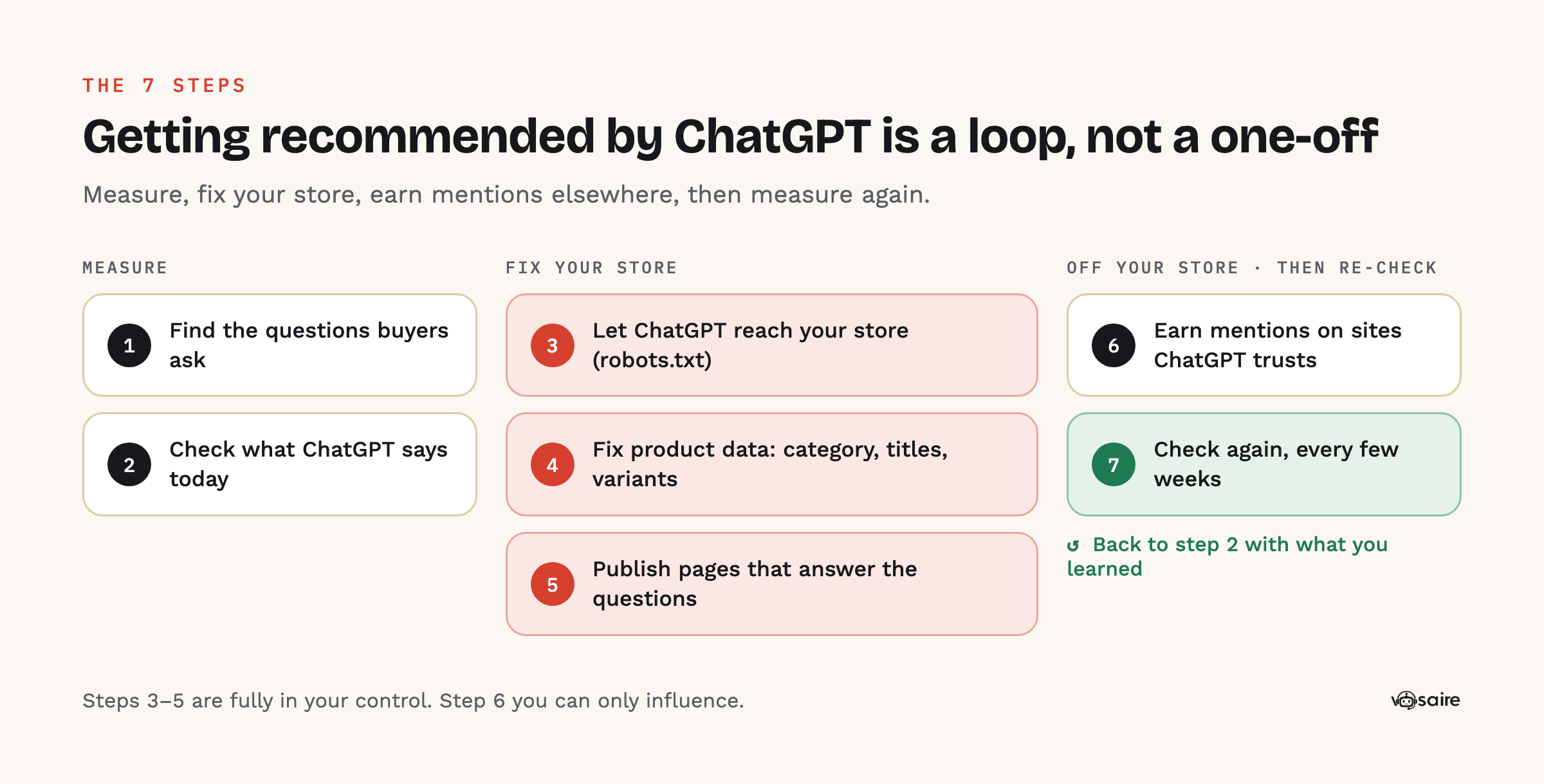
Step 1: Find the questions your buyers actually ask
Before fixing anything, write down what you want to be recommended for. Shoppers ask assistants long, specific questions, so think in sentences, not keywords:
- "Best merino base layer for skiing under $100"
- "Is [your brand] legit?"
- "Gift for a coffee lover who already has a grinder"
- "[Your product] vs [competitor product]"
Aim for 15–30 questions across:
| Type | Example |
|---|---|
| Category + need | "Waterproof hiking boots for wide feet" |
| Price band | "Best espresso machine under $300" |
| Use case / person | "Running shoes for a beginner training for a 10k" |
| Comparison | "Allbirds vs [your brand] wool sneakers" |
| Brand trust | "Is [your brand] good quality?" |
Good sources: your customer support inbox, product reviews, the "People also ask" box on Google, and Reddit threads in your niche.
Step 2: Check what ChatGPT says today
Open ChatGPT, make sure search is on, and ask each question the way a shopper would. For each answer, note:
- Were you named? In what position?
- Which brands were named instead?
- Which sources did ChatGPT cite (the small links under the answer)?
Do this in a logged-out or temporary chat so your own history doesn't skew it, and ask the important questions more than once: answers vary between runs. This gives you a baseline and, more usefully, a list of the sites ChatGPT trusts in your category.
Want a quick first look without doing it by hand? Our free AI visibility check writes 3 buyer questions from your store, asks ChatGPT with web search on, and shows who it names instead of you and which sites it read.
Step 3: Make sure ChatGPT can reach your store
This is the quickest step, and if it's wrong nothing else matters.
Remove the password page. If your store is still password-protected (common for new stores), crawlers see only the password screen.
Allow the right crawlers in robots.txt. OpenAI runs several bots, and they do different jobs (OpenAI):
| Bot | What it does | Block it? |
|---|---|---|
| OAI-SearchBot | Decides which sites can appear in ChatGPT search answers | No. OpenAI says sites that opt out "will not be shown in ChatGPT search answers" |
| ChatGPT-User | Visits a page when a user's question needs it | Usually no |
| GPTBot | Collects content that may be used to train OpenAI's models | Your choice; it doesn't control search visibility |
The same pattern applies elsewhere: allow PerplexityBot to appear in Perplexity answers (Perplexity) and Claude-SearchBot for Claude's search (Anthropic).
To check, visit yourstore.com/robots.txt and look for Disallow: / under any of those user agents. Shopify's default robots.txt is set up well for search, and Shopify only lets you change it by adding a robots.txt.liquid template under Online Store → Edit code. Shopify warns that this is an unsupported customization and that "incorrect use of the feature can result in loss of all traffic," so edit it carefully or not at all (Shopify Help Center). If you find AI bots blocked and you didn't add the rule, look for an old theme edit or a firewall/bot-protection setting from a third-party service.
After a change, OpenAI says it can take about 24 hours for search results to reflect it.
Publish your policies. Fill in your refund, shipping, privacy and terms policies under Settings → Policies. Shoppers ask assistants about returns and delivery, and an assistant can't vouch for a store whose policies it can't find.
Step 4: Fix your product data
ChatGPT's shopping results are built from product information. OpenAI says ChatGPT may consider price and reviews when choosing products, ranks merchants on "availability, price, quality, and whether they are the maker or primary seller," and includes Shopify merchants through Shopify Catalog (OpenAI Help Center). Shopify's own guide to optimizing for AI asks for clear titles, detailed specifications, comparison information, sizing guides, materials and care instructions (Shopify Help Center).
Work through your best-sellers first:
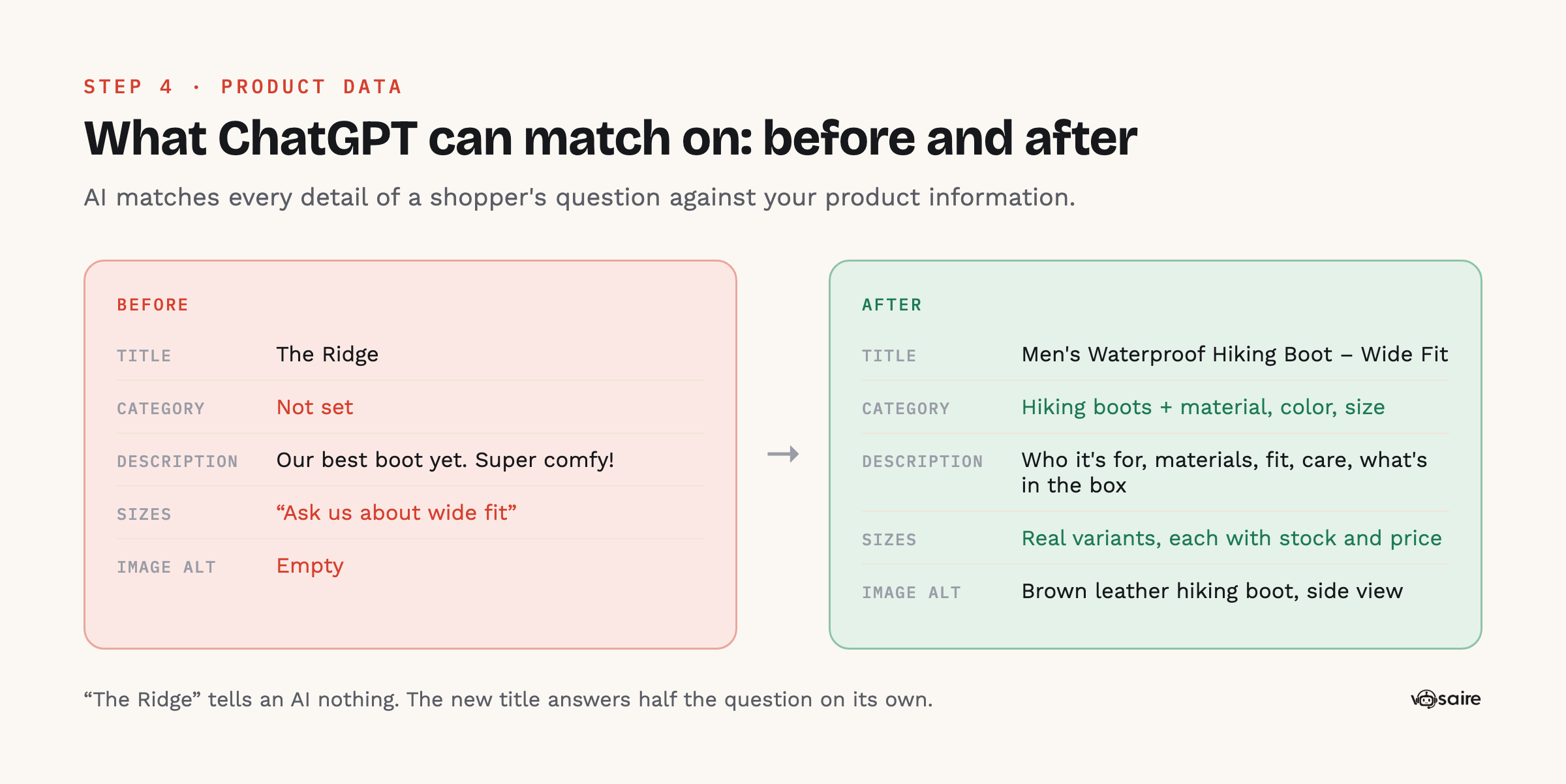
- Set the product category. In each product, choose a category from Shopify's Standard Product Taxonomy, then fill in the category metafields it unlocks (material, color, size, age group and so on). Shopify says these make products "more discoverable by visitors on your site, on marketplaces, and on search engines" (Shopify Help Center).
- Rewrite vague titles. "The Ridge" tells an AI nothing; "Men's Waterproof Hiking Boot – Wide Fit" tells it everything it needs to match a question.
- Answer the questions in the description. Who is it for? What's it made of? How does it fit? What's in the box? How do you care for it? Use plain sentences and bullet lists, not just adjectives.
- Get variants right. Each size and color should be a real variant with its own stock and price, not a note in the description.
- Add alt text to images. Describe what's in the photo, plainly.
- Keep price and stock accurate. An assistant recommending an out-of-stock product, or quoting an old price, is bad for you and for it.
Check your agentic storefront channels. Shopify makes products from eligible stores available in ChatGPT, Google AI Mode, Gemini, Microsoft Copilot and Meta, and you can see and manage these under Sales channels → Agentic (Shopify Help Center). Open it and confirm the channels you want are on.
Step 5: Publish pages that answer the questions
Go back to your list from Step 1. For every question where ChatGPT named someone else, ask: is there a page on my store that directly answers this? Usually there isn't. Fix that with:
- Buying guides ("How to choose a merino base layer for skiing")
- Comparison pages ("Our wool sneaker vs Allbirds Tree Runners: honest differences")
- Use-case pages ("The best gifts for coffee lovers who already own a grinder")
- FAQ sections on product and collection pages
Write them to be quoted:
- Put a 2–3 sentence direct answer at the top. Assistants quote short, clear passages.
- Use headings phrased as the question.
- Include specifics: numbers, materials, sizes, prices, who it's not for.
- Link to the products the page recommends.
- Be honest. A comparison page that admits where the other product is better is far more credible, to people and to AI, than one that claims you win everything.
Also open Shopify's free Knowledge Base app, where you can review the FAQs that AI shopping agents use about your store and add your own (Shopify Help Center).
Step 6: Earn mentions on sites ChatGPT trusts
Look at the sources ChatGPT cited in Step 2. Those are the sites it trusts for your category, and getting onto them is often what makes the difference for competitive questions.
| Source type | What to do |
|---|---|
| Product reviews | Ask every customer for a review after delivery. OpenAI lists reviews among the things ChatGPT may consider. |
| "Best of" roundups | Email the writers of roundups that ChatGPT cites. Offer a sample and a clear reason you belong on the list. |
| Reddit and forums | Answer questions in your niche helpfully and openly as the brand. Never post fake reviews. |
| YouTube and creators | Send products to reviewers your buyers already watch. |
| Comparison and directory sites | Make sure your listing on relevant directories and marketplaces is accurate and complete. |
This is the slowest step and there's no shortcut. It's also the one competitors find hardest to copy.
Step 7: Check again, and keep checking
Re-ask your questions every two to four weeks and compare with your baseline:
- Are you named for more questions than before?
- Has your position in the answers improved?
- Are you now cited as a source, not only named?
- Are AI assistants sending you visits and orders?
For that last one, see our guide to tracking ChatGPT traffic and sales in Shopify. And remember that answers vary between runs, so look at the trend across several checks, not any single answer.
Quick checklist
- 15–30 buyer questions written down
- Baseline: who ChatGPT names for each, and which sources it cites
- No password page; OAI-SearchBot, PerplexityBot and Claude-SearchBot allowed
- Refund, shipping, privacy and terms policies published
- Best-sellers: category + category metafields, clear titles, full descriptions, real variants, alt text
- Agentic storefront channels checked under Sales channels → Agentic
- One answer page for each question you lose
- Review requests running; outreach to the sites ChatGPT cites
- Re-check every 2–4 weeks
FAQ
How long does it take for ChatGPT to start recommending my store?
Crawler fixes can show up within about a day of ChatGPT's search picking up the change. New pages and product changes usually take weeks to be crawled and to affect answers. Competitive questions dominated by big brands can take months, mostly because they depend on mentions from other sites.
Should I block GPTBot?
That's a business decision about whether your content may be used to train OpenAI's models. It's separate from appearing in ChatGPT search, which is controlled by OAI-SearchBot. Many stores allow both; some block GPTBot and allow OAI-SearchBot.
Does adding an llms.txt file get me into ChatGPT?
There's no evidence that it does on its own. It's harmless and cheap, but your crawler access, product data, answer pages and reviews matter much more.
Can I pay to be recommended by ChatGPT?
OpenAI says its product results "are not ads, nor influenced by any OpenAI partnerships," and ads are shown separately (OpenAI Help Center). Organic recommendations have to be earned with the steps above.
Is there a faster way to do Steps 2 and 7?
Asking dozens of questions across several assistants every few weeks gets tedious. Apps can run the checks for you and show who wins each question. We compared the options in the best AI visibility apps for Shopify. Our own, Vosaire AI Visibility, also explains why competitors win and drafts the product fixes and answer pages for you to approve (how it works).